
This is MONAI 3D augmentation for tumor / organ segmentation: RandAffined, RandRotated, RandGaussianNoised, then (if you want) write the tensors back to NIfTI. It is not how to resample, window HU, crop, or build the DataLoader — that is preprocessing 3D volumes in MONAI. It is not how a clinician calculates tumor volume.
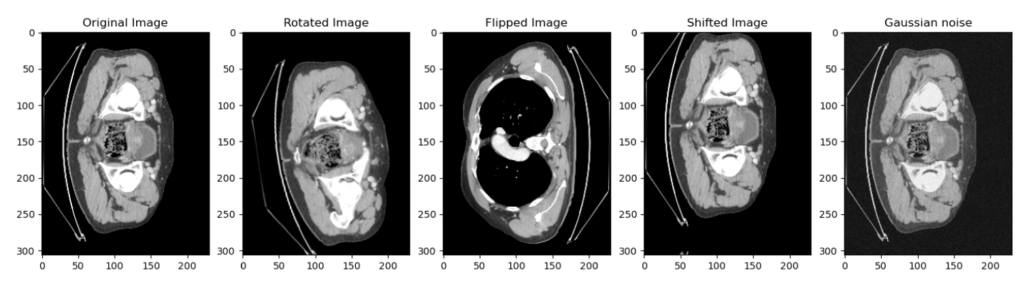
One training example is one patient (a 3D volume), not one JPEG. You rarely have enough patients. Augmentation is how you get more views of the ones you have. On medical volumes you stay conservative: flip, small rotation, shift, Gaussian noise. Heavy 2D warps invent anatomy that is not in a body.
Video of the same 2021 notebook: 3D volume augmentation in MONAI.
Three ways to apply it
- On the fly, each epoch. Put the random transforms in the training
Compose. Same patient count; a different draw every epoch. You never see the sample before the loss does. - Pre-generate and save NIfTI. Run the compose, write
.nii.gz, open the volumes, delete the junk, then train on original + kept synthetics. This is the path that actually got used. - Pre-generate in RAM. Same as (2) but you keep tensors in memory instead of files. Same idea as a TF generator; you write the loop.
Affine + noise can invent a shape that is not a body. That is why (2) won: generate, look, delete, then train. The code below is the 2021 dictionary API (AddChanneld, RandAffined). Newer MONAI renamed the channel step to EnsureChannelFirstd; the rest of the compose is the same job.
Path dictionary
Same layout as the preprocessing post: TrainData / TrainLabels / ValData / ValLabels, one {"image", "label"} dict per patient. Full walkthrough of that dict is on the preprocessing page.
data_dir = 'Path to your data'

train_images = sorted(glob(os.path.join(data_dir, 'TrainData', '*.nii.gz')))
train_labels = sorted(glob(os.path.join(data_dir, 'TrainLabels', '*.nii.gz')))

val_images = sorted(glob(os.path.join(data_dir, 'ValData', '*.nii.gz')))
val_labels = sorted(glob(os.path.join(data_dir, 'ValLabels', '*.nii.gz')))

train_files = [{"image": image_name, 'label': label_name} for image_name, label_name in zip(train_images, train_labels)]
val_files = [{"image": image_name, 'label': label_name} for image_name, label_name in zip(val_images, val_labels)]
On the fly (during training)
If you augment during training you fold it into the same compose as preprocessing. Each patient is resampled, windowed, then randomly transformed before it becomes a tensor.
RandAffined— here used for translation (translate_range=10). Can also rotate / scale if you drop the separate rotate.RandRotated—range_x=10.0as in the 2021 snippet. In MONAI that argument is radians, so 10 is a full spin. Tighten it if the volumes look nonsense.RandGaussianNoised— image only. Do not noise the label.
Flip / zoom exist in MONAI (Flipd, Zoomd) and are safe if you keep them small. They are not in this compose.
generat_transforms = Compose(
    [
        LoadImaged(keys=["image", "label"]),
        AddChanneld(keys=["image", "label"]),
        Spacingd(keys=["image", "label"], pixdim=(1.5, 1.5, 2.0), mode=("bilinear", "nearest")),
        Orientationd(keys=["image", "label"], axcodes="RAS"),
        ScaleIntensityRanged(keys=["image"], a_min=-200, a_max=200, b_min=0.0, b_max=1.0, clip=True,),
        RandAffined(keys=['image', 'label'], prob=0.5, translate_range=10),
        RandRotated(keys=['image', 'label'], prob=0.5, range_x=10.0),
        RandGaussianNoised(keys='image', prob=0.5),
        ToTensord(keys=["image", "label"]),
    ]
)
Pre-generate and save NIfTI
Same compose, then a function that takes the batch tensors and writes two .nii.gz files. You can run preprocess + augment together (compose above) or augment only:
generat_transforms = Compose(
    [
        LoadImaged(keys=["image", "label"]),
        AddChanneld(keys=["image", "label"]),
        RandAffined(keys=['image', 'label'], prob=0.5, translate_range=10),
        RandRotated(keys=['image', 'label'], prob=0.5, range_x=10.0),
        RandGaussianNoised(keys='image', prob=0.5),
        ToTensord(keys=["image", "label"]),
    ]
)
Torch tensor → numpy → nib.Nifti1Image. The affine written here is np.eye(4) (voxel grid). Spacing from Spacingd is not put back into the header. If you need mm in the file, pass the real affine / zooms instead of identity. Same conversion pattern as array to NIfTI.
def save_nifti(in_image, in_label, out, index = 0):
    # Convert the torch tensors into numpy array
    volume = np.array(in_image.detach().cpu()[0, :, :, :], dtype=np.float32)
    lab = np.array(in_label.detach().cpu()[0, :, :, :], dtype=np.float32)

    # Convert the numpy array into nifti file
    volume = nib.Nifti1Image(volume, np.eye(4))
    lab = nib.Nifti1Image(lab, np.eye(4))

    # Create the path to save the images and labels
    path_out_images = os.path.join(out, 'Images')
    path_out_labels = os.path.join(out, 'Labels')

    # Make directory if not existing
    if not os.path.exists(path_out_images):
        os.mkdir(path_out_images)
    if not os.path.exists(path_out_labels):
        os.mkdir(path_out_labels)

    path_data = os.path.join(out, 'Images')
    path_label = os.path.join(out, 'Labels')
    nib.save(volume, os.path.join(path_data, f'patient_generated_{index}.nii.gz'))
    nib.save(lab, os.path.join(path_label, f'patient_generated_{index}.nii.gz'))

    print(f'patient_generated_{index} is saved', end='r')
number_runs = 10 walks the whole train set ten times. Each pass redraws the random transforms, so you get up to 10× the patient count (minus the ones you delete).
output_path = 'D:/3_Stage/ALL_THE_DATA/generated_data'
number_runs = 10
for i in range(number_runs):
    name_folder = 'generated_data_' + str(i)
    os.mkdir(os.path.join(output_path, name_folder))
    output = os.path.join(output_path, name_folder)
    check_ds = Dataset(data=train_files, transform=generat_transforms)
    check_loader = DataLoader(check_ds, batch_size=1)
    check_data = first(check_loader)
    for index, patient in enumerate(check_loader):
        save_nifti(patient['image'], patient['label'], output, index)
    print(f'step {i} done')
Open the written volumes. Delete any patient whose shape is not a body. Then train.
Original vs generated slice
original_ds = Dataset(data=train_files, transform=original_transforms)
original_loader = DataLoader(original_ds, batch_size=1)
original_patient = first(original_loader)

generat_ds = Dataset(data=train_files, transform=generat_transforms)
generat_loader = DataLoader(generat_ds, batch_size=1)
generat_patient = first(generat_loader)
number_slice = 30
plt.figure("display", (12, 6))
plt.subplot(1, 2, 1)
plt.title(f"Original patient slice {number_slice}")
plt.imshow(original_patient["image"][0, 0, :, :, number_slice], cmap="gray")
plt.subplot(1, 2, 2)
plt.title(f"Generated patient slice {number_slice}")
plt.imshow(generat_patient["image"][0, 0, :, :, number_slice], cmap="gray")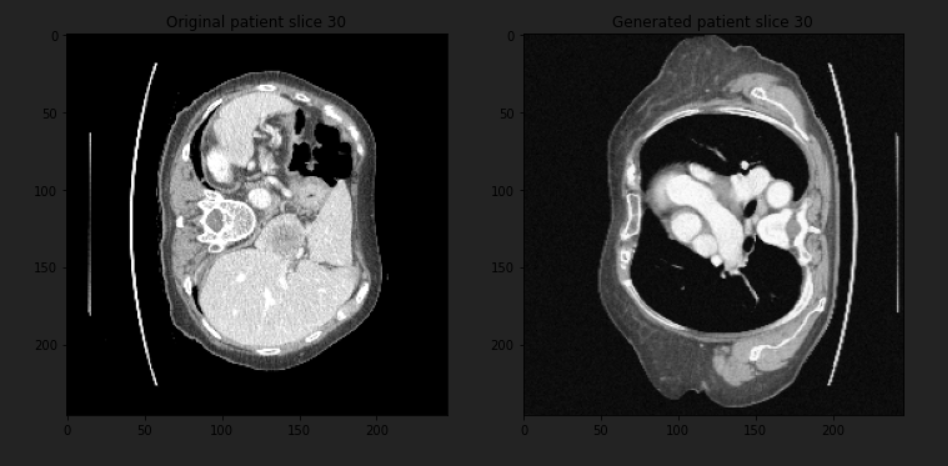
Same notebook: amine0110/data-augmentation-for-3D-volumes. Spacing, HU window, crop, resize, and the DataLoader stay on the preprocessing post — do not merge the two.
PYCAD builds custom segmentation pipelines and web DICOM viewers when the mask has to live next to the series in an app. Case studies.