
So, you're wondering if you can use Dropbox to handle patient data and still stay on the right side of HIPAA. The short answer is yes, but with some very important strings attached. It’s absolutely not a plug-and-play solution.
Getting this right depends entirely on three things: having the right Dropbox subscription, signing a critical legal document, and then locking down your security settings with precision.
The Ground Rules for Dropbox HIPAA Compliance
Think of it like this: Dropbox gives you a powerful, secure vault. But the vault is only as good as the person managing it. If you leave the door wide open or hand out keys to everyone, the vault's strength doesn't matter. You, as the healthcare provider, are responsible for using the tools Dropbox provides to protect that sensitive information.
Making Dropbox a compliant part of your workflow is a deliberate process. It's not a switch you flip. It's a combination of a formal agreement, smart technical setup, and consistent oversight from your team.
This flowchart breaks down the very first questions you need to answer.
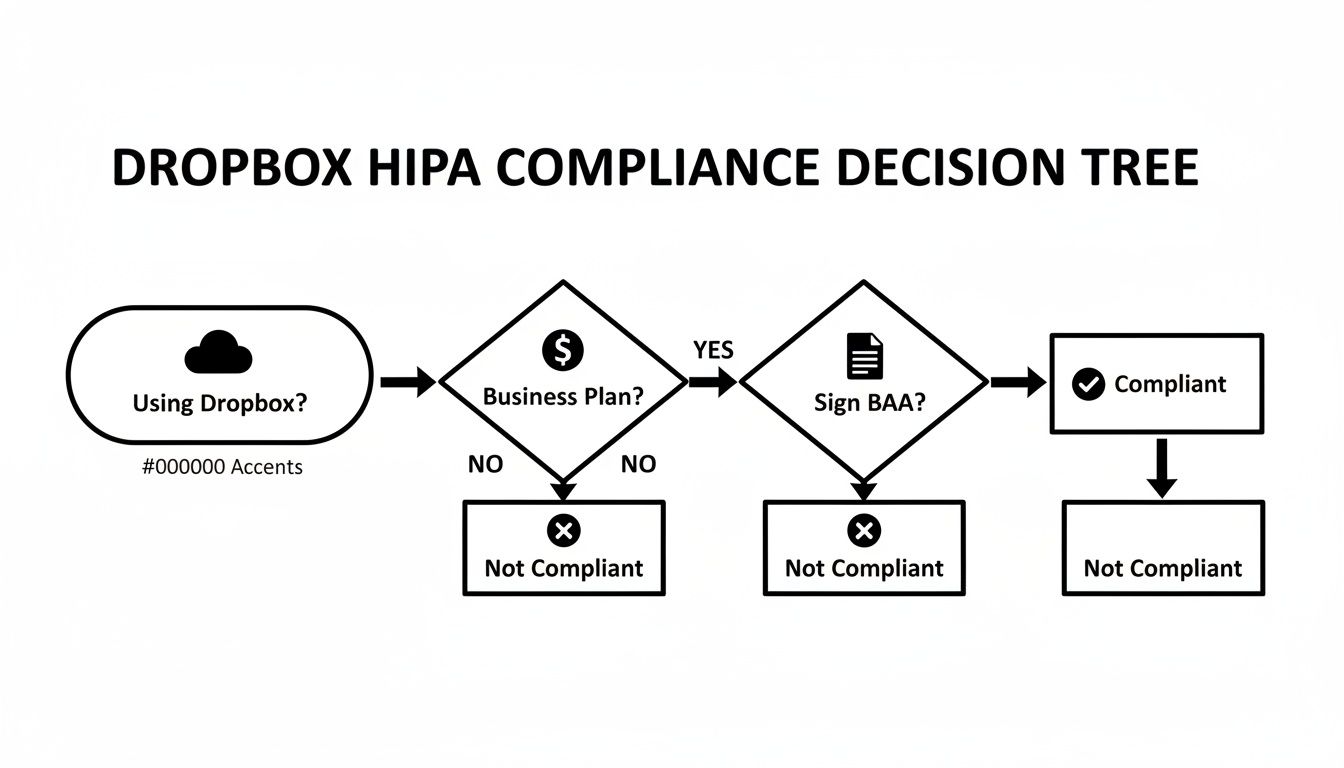
As you can see, if you don't have a business-tier plan and a signed Business Associate Agreement (BAA), you've already hit a dead end.
The Non-Negotiable First Steps
Before a single piece of Protected Health Information (PHI) touches the cloud, you have to get these foundational pieces in place. They are the bedrock of a secure system. Without them, all the other fancy security features are essentially useless.
Here’s what you absolutely must do:
- Get the Right Plan: HIPAA compliance is only an option on specific Dropbox plans, namely the Advanced and Enterprise tiers.
- Sign a Business Associate Agreement (BAA): This is the legal handshake. It's a contract that legally requires Dropbox to protect PHI according to HIPAA's strict rules.
- Configure Your Defenses: It's on your team to enable and manage key security settings like multi-factor authentication, strict user permissions, and detailed activity logs.
- Train Your People: Every single person with access must know their role in safeguarding patient data and stick to the security protocols you establish.
To give you a clearer picture, here's a quick checklist summarizing these core requirements.
Dropbox HIPAA Compliance Checklist At a Glance
| Requirement | Status on Dropbox | Action Required |
|---|---|---|
| Eligible Plan | Available only on specific tiers | Subscribe to a Dropbox Advanced or Enterprise plan. |
| Business Associate Agreement (BAA) | Available upon request for eligible plans | You must contact Dropbox and sign the BAA before storing any PHI. |
| Access Controls | Provided within plan features | Configure granular user permissions and team roles. Enforce strong passwords. |
| Audit Controls | Included in eligible plans | Regularly review activity logs and audit trails for suspicious behavior. |
| Encryption | Standard for data in transit and at rest | Ensure your team follows best practices for secure file sharing. |
| Team Training | Not provided by Dropbox | Develop and implement your own HIPAA security and awareness training program. |
This table underscores that while Dropbox provides the necessary tools, the responsibility for building and maintaining a compliant environment falls squarely on your shoulders.
Why Your Plan Matters So Much
The difference between a personal Dropbox plan and a business one isn't just about storage space—it's about a fundamental commitment to security and legality. Only the Business Advanced and Enterprise plans are set up to support a BAA, which is the cornerstone of handling PHI.
A personal or basic plan won't cut it. In fact, this policy impacts a staggering 90% of free-tier users around the globe. In the U.S. healthcare sector, where organizations face over 1,200 PHI-related cyber threats every day, using the wrong plan isn't just a mistake; it's a massive risk. For a deeper dive into these security considerations, check out this in-depth HIPAA analysis.
At PYCAD, we know that real security, especially for complex data like medical images, requires more than just a cloud folder. We at PYCAD, build custom web DICOM viewers and integrate them into medical imaging web platforms. You can see some of our solutions in action on our portfolio page.
The Business Associate Agreement Demystified
Before a single patient file ever touches a Dropbox folder, there's a critical first step that's absolutely non-negotiable: the Business Associate Agreement (BAA). This isn't just another document to sign. It's the legal backbone that makes using Dropbox for HIPAA-regulated data even possible. Without it, everything else you do for security is, frankly, irrelevant in the eyes of regulators.
Think of the BAA as a formal, binding handshake between your healthcare organization (the "Covered Entity") and Dropbox (the "Business Associate"). This contract legally obligates Dropbox to protect any Protected Health Information (PHI) you entrust to them, holding them to the same strict standards you follow. It transforms Dropbox from a simple cloud storage vendor into a genuine partner in your data security strategy.
What Does the BAA Actually Do?
Signing a BAA does more than just tick a compliance box. It contractually binds Dropbox to a powerful set of responsibilities, ensuring they’re held to the same high bar for data protection that HIPAA demands from you.
Here’s what the agreement legally puts in place:
- PHI Safeguarding: Dropbox officially commits to implementing all the necessary administrative, physical, and technical safeguards to keep patient data safe from prying eyes.
- Breach Reporting: If a data breach involving your PHI ever happens on their end, Dropbox is legally required to notify you immediately. This lets you take the critical steps outlined in the HIPAA Breach Notification Rule.
- Subcontractor Compliance: The agreement ensures that any third-party services Dropbox uses are also bound by the same tough HIPAA rules, extending the chain of trust and accountability.
- HHS Cooperation: Dropbox agrees to fully cooperate with the U.S. Department of Health and Human Services (HHS) if they ever conduct an investigation or compliance audit.
This legal framework is what makes all the difference. It's what separates a generic cloud service from one that’s prepared to handle the immense responsibility that comes with healthcare data.
The BAA Is Your Starting Line, Not the Finish Line
It's a common mistake to think that once the BAA is signed, your work is done and compliance is automatic. Nothing could be further from the truth. The BAA is the permission slip that allows you to start building a compliant workflow. You are still the one who has to build and maintain that secure environment.
The Business Associate Agreement doesn't grant instant compliance; it grants permission. It confirms Dropbox's commitment to protect data, but it's your configuration, policies, and ongoing vigilance that truly achieve a HIPAA-compliant state.
Dropbox first started offering BAAs for its business-tier customers around 2013, a pivotal moment that made it a viable option for the healthcare industry. By signing a BAA, which is available with their Business Advanced and Enterprise plans, Dropbox formally accepts its role and responsibilities under the HIPAA Omnibus Rule. You can get a deeper look into their security measures in this official HIPAA compliance guide.
Understanding the BAA is your key to looking past marketing fluff and seeing what a true compliance partnership really means. It's the essential first pillar of your data governance strategy.
But even with a solid BAA and secure infrastructure, handling complex data like medical images often demands more specialized tools. At PYCAD, that’s where we shine. We at PYCAD, build custom web DICOM viewers and integrate them into medical imaging web platforms, creating solutions built for the unique challenges of diagnostic data. Take a look at our work on our portfolio page.
Configuring Dropbox for Maximum PHI Security
Signing the Business Associate Agreement is the starting gun, but the real race is just beginning. Now, it's time to transform your standard Dropbox Business account into a secure fortress, one specifically engineered to protect patient health information (PHI). This isn't about simply using the platform; it's about mastering its security controls to meet the rigorous demands of HIPAA's technical safeguards.
Think of it like moving from a standard house lock to a full-blown bank vault system. You have the tools right there in front of you, but you have to be the one to activate and configure every single one. This is where you shift from just understanding the rules to actively implementing them, building a compliant environment one crucial setting at a time.
Fortifying Your First Line of Defense
The single most powerful security move you can make is enabling multi-factor authentication (MFA). For any HIPAA-compliant setup, requiring MFA for all users is completely non-negotiable. It adds a critical layer of verification that goes beyond a simple password, dramatically cutting down the risk of unauthorized access from stolen credentials.
Next, you need to dive deep into user permissions. The HIPAA Security Rule is built on the "minimum necessary" principle, which means your team members should only have access to the PHI they absolutely need to do their jobs. Nothing more. Dropbox gives you the ability to set granular permissions for every file and folder, ensuring a new administrative assistant can't stumble into sensitive patient records meant only for clinical staff.
These initial steps are your digital locks and keycards—the absolute foundation of your secure system.

Implementing Granular Sharing and Data Controls
How you share sensitive information is every bit as important as how you store it. One of the biggest security risks comes from creating public, unprotected links to sensitive documents. Fortunately, a HIPAA-compliant Dropbox plan gives you powerful controls to shut this down.
You absolutely must configure your settings to enforce:
- Password-Protected Links: Every single shared link containing PHI must be locked down with a unique, strong password.
- Expiring Links: Put a timer on access. Setting expiration dates on all shared links prevents them from floating out there forever.
- Disabled Permanent Deletion: Here's an often-overlooked but critical feature. Disabling the ability for users to permanently delete files ensures data integrity and helps you maintain a complete record for any future audits.
Dropbox’s commitment to these features has been a key driver in its enterprise growth. The business plans that offer compliance features now contribute to $2.5 billion in annual recurring revenue. After a 2012 breach that impacted a staggering 68 million users, the company invested heavily in security. Today, its HIPAA-compliant plans feature granular controls like password-protected links with 90-day expirations—a feature that has seen its use jump by 40% among medical practices since 2020.
To put these configurations into perspective, let's look at how the default settings stack up against what's needed for HIPAA compliance.
Essential Dropbox Security Settings for HIPAA
This table breaks down the crucial shifts you need to make from standard settings to a truly secure, HIPAA-aligned configuration.
| Security Feature | Default Setting | Recommended HIPAA Configuration |
|---|---|---|
| Multi-Factor Authentication | Optional; user-enabled | Mandatory for all team members; enforced by the administrator. |
| User Permissions | Broad access by default | Apply the Principle of Least Privilege; grant access only to the specific files/folders a user needs. |
| Shared Links | Public by default (anyone with the link can view) | Team-only access by default; require passwords and set expiration dates for all external shares. |
| File Deletion | Users can permanently delete files | Disable permanent deletion to ensure data can be recovered for audits and data integrity purposes. |
| Audit Log Reviews | Not actively monitored | Regularly scheduled reviews of all file access, sharing events, and permission changes. |
Moving from the left column to the right isn't just a suggestion; it's a fundamental requirement for protecting patient data and staying compliant.
Mastering Audit Logs for Unwavering Accountability
Finally, we come to your most powerful tool for maintaining continuous compliance: Dropbox's audit log. HIPAA demands that you can track and examine every bit of activity related to electronic PHI. The audit log is your unchangeable, time-stamped record of every single action taken within your account.
Reviewing these logs regularly isn't just a good idea—it's essential. You can monitor who accessed which files, see all sharing events, and track changes to user permissions. This creates a transparent record that holds every team member accountable and allows you to spot and respond to any suspicious activity in a heartbeat. You can find more strategies for protecting data in motion in our guide on HIPAA-compliant data transfer methods.
While these Dropbox settings are vital, they're still just one piece of a much larger security puzzle. A truly robust strategy is guided by a comprehensive security mindset, like the one outlined in these actionable DevOps security best practices.
Where Dropbox Hits a Wall with Medical Imaging
So you've done your homework. You've navigated the security settings, signed the BAA with Dropbox, and feel confident about managing your patient data. For things like intake forms, billing records, and administrative documents, you’re in great shape. But the moment you try to manage medical images, you've run into a serious limitation—a fundamental gap that many practices discover the hard way.
Dropbox is fantastic for what it does, but it was never built for the complex world of diagnostic imaging. Think of it like this: you wouldn't use a standard word processor to edit a professional video. Sure, you could probably type out a script, but you're missing the entire suite of tools needed for the actual job. The same logic applies here.
The DICOM Dilemma
The heart of the issue is the DICOM (Digital Imaging and Communications in Medicine) format. A DICOM file isn't just a picture like a JPEG. It's a sophisticated data package that bundles high-resolution imaging with a ton of critical patient metadata—everything from the patient's name and ID to the specific scanner settings used during the exam.
Dropbox sees a DICOM file as just another blob of data. It has no idea how to interpret the layers of information packed inside.
- No Way to View It: You can't just click on a DICOM file in Dropbox and see the scan. Clinicians are forced to download entire studies—often hundreds of megabytes—just to open them on their local computers.
- Zero Diagnostic Tools: All the essential tools a radiologist needs, like zooming, panning, measuring, and annotating, are completely missing.
- Hidden Metadata: That crucial patient and study information embedded in the file? It’s locked away and invisible until you open it with specialized software.
This isn't just inconvenient; it creates a clunky, time-consuming workflow that can actively slow down patient care.

This image perfectly captures the frustration. A general-purpose tool just doesn't cut it when you need a specialized platform built for medical imaging.
Security Blind Spots in Imaging Workflows
Beyond the sheer frustration, forcing medical images into a system like Dropbox creates real security headaches. Every time a clinician downloads a massive DICOM study to their local machine, it creates another copy of Protected Health Information (PHI) living outside of your secure cloud environment. This dramatically expands your risk of a data breach.
Worse yet, those files are full of sensitive patient identifiers that need careful handling. Properly managing this requires a deep understanding of the data itself. If you want to dive deeper into how this sensitive information is protected, our guide on what is data anonymization is a great starting point. It's a core concept in medical data security, and it's not something a generic file-sharing service can manage for you.
Relying on a general file-sharing service for DICOM files is a critical mistake. It values storage over the vital needs of viewing, collaboration, and the secure handling of embedded patient data, leading to a workflow that is neither efficient nor truly compliant.
This is exactly the problem specialized platforms were designed to solve. At PYCAD, we don’t just store medical data; we build the secure, interactive environments needed to actually use it. We at PYCAD, build custom web DICOM viewers and integrate them into medical imaging web platforms. Our approach lets clinicians view, analyze, and collaborate on diagnostic studies right from their web browser—no risky downloads, no clumsy workarounds. You can explore some of our projects on our portfolio page.
Maintaining a Culture of Continuous Compliance
Getting Dropbox to a HIPAA compliant state isn't a one-time project you can just check off a list. Think of it more as a commitment—a living, breathing part of your practice’s daily rhythm. True security is all about building an unshakable culture of compliance that protects your patients and your organization, day in and day out.
This journey is about shifting compliance from a technical checklist into a shared mindset. It’s about empowering every single team member to become a guardian of patient data. The goal is to move beyond simply having the right settings and foster an environment where handling data securely is second nature for everyone involved.
This proactive stance is what separates a practice that just meets the rules from one that truly leads in patient data stewardship.
From Policy to Daily Practice
Building this kind of culture starts with clear, consistent education. Your team needs more than just a list of rules; they need to understand the why behind them. This is why comprehensive training on the secure handling of PHI within Dropbox isn't optional—it's the bedrock of your entire security posture.
This means putting clear, easy-to-follow policies in place for everything from file naming conventions to sharing protocols. When someone on your team needs to share a file, they shouldn't have to guess the right way to do it. The secure path should always be the easiest and most obvious one. A deep understanding of the principles of data governance is crucial here, as it provides the framework for managing all organizational data, not just PHI.
Ultimately, this establishes a baseline of knowledge that turns your team from a potential risk into your strongest line of defense.
Vigilance Through Audits and Access Control
Trust is essential in any team, but when it comes to PHI, verification is mandatory. Regularly auditing user permissions and access logs is how you ensure your security policies are actually being followed in the real world. These audits aren't about catching people making mistakes; they're about spotting potential issues before they can ever escalate into breaches.
A key pillar of this is enforcing the Principle of Minimum Necessary Access. It's a simple but powerful idea: every team member should only have access to the absolute minimum amount of PHI required to do their job. Nothing more.
Continuous compliance is an active pursuit. It requires regular audits, strict adherence to the 'minimum necessary' principle, and immediate action when access rights change, ensuring the security framework never weakens.
Think of it like giving out keys to a building. The front desk staff doesn't need a key to the medical records vault. This principle drastically minimizes your risk exposure and is a core tenet of HIPAA.
Managing Employee Transitions Securely
One of the most vulnerable moments for your data security is when an employee leaves the organization. A well-defined offboarding process is absolutely critical to preventing both accidental and intentional data leaks.
Your offboarding checklist has to include immediate actions:
- Revoke Access Instantly: The very moment an employee’s tenure ends, their access to Dropbox and all other systems containing PHI must be terminated. No exceptions.
- Transfer File Ownership: Make sure all work-related files and folders are smoothly transferred to a supervisor or a departmental account to avoid losing critical information.
- Wipe Company Devices: Any company-issued devices must be securely wiped to remove every last trace of PHI.
This isn't just about locking down files; it’s about ensuring the seamless continuity of care while closing any potential security gaps. At PYCAD, we know that robust platforms are built on these exact principles. That's why we at PYCAD, build custom web DICOM viewers and integrate them into medical imaging web platforms, ensuring security is woven into the fabric of the workflow. You can see our dedication to secure design on our portfolio page.
So, What's the Real Answer? Can You Use Dropbox in Healthcare?
After diving deep into the technical specs, legal requirements, and very real limitations, where do we land? Can you actually use Dropbox in a healthcare setting? The honest answer is: it completely depends on how you plan to use it. The right choice is always dictated by the kind of data you're working with day in and day out.
For things like administrative files, patient intake forms, and general PHI documents, a properly locked-down Dropbox Business account can be a solid, dependable choice. As long as you have a signed Business Associate Agreement (BAA) in place and have meticulously configured all the security controls, it’s a powerful tool for team collaboration and file storage.
But—and this is a big but—we have to be crystal clear about its limits. If your workflow involves DICOM files or any other kind of complex medical imaging, Dropbox is simply not the right tool for the job. It just wasn't built for it. You'll find it's missing the essential viewing, annotation, and metadata handling features that are non-negotiable for any kind of diagnostic work. Trying to force it creates frustrating inefficiencies and opens the door to serious security risks.
Your Tools Should Fit Your Workflow, Not the Other Way Around
The technology you choose should be a direct reflection of your practice's reality. That starts with taking an honest look at what you and your team actually do with data every single day.
- Is your main focus on document management? If so, a securely configured Dropbox account could be a fantastic asset.
- Does your practice live and breathe medical imaging? Then you absolutely need a specialized platform designed from the ground up for the unique challenges of diagnostic data.
This isn't just about convenience; it's a fundamental part of keeping patient data safe and running an efficient practice. For a broader look at how to approach this, our guide on medical data storage solutions provides some great perspective.
Let this be your call to action. Make an informed, proactive choice that places patient data security at the absolute heart of your technology decisions. Your tools shouldn't just be a place to dump files—they should actively support secure, efficient, and compliant work.
This is the exact problem we get excited about solving. Here at PYCAD, we build custom web DICOM viewers and integrate them into medical imaging web platforms. We create systems designed specifically for the complex world of healthcare. Our solutions deliver the seamless, compliant, and powerful workflows that modern medicine demands, a philosophy that shines through in all our projects. You can see the specialized systems we’ve built for others on our portfolio page.
At the end of the day, making Dropbox HIPAA compliant is possible for certain administrative tasks. But real, lasting security comes from a much simpler idea: choosing the perfect tool for each specific job. This ensures that every piece of patient information is protected by a system built to handle it flawlessly.
Your Top Questions About Dropbox and HIPAA, Answered
Thinking through how a tool like Dropbox fits into a healthcare setting always brings up important questions. Let's tackle some of the most common ones head-on so you can move forward with clarity and confidence.
Can I Use a Personal Dropbox Plan for Patient Data?
Absolutely not. This is a hard line in the sand. HIPAA compliance is a feature reserved exclusively for their top-tier business plans: Dropbox Advanced and Enterprise.
Why the distinction? It's simple. Dropbox will only sign the legally-mandated Business Associate Agreement (BAA) for customers on these specific plans. If you're using a Personal or Basic account to handle any kind of Protected Health Information (PHI), you're not just bending the rules—you're breaking them and putting sensitive data in jeopardy.
So, Signing a BAA Means My Account is Compliant, Right?
Not quite, and this is a crucial point to understand. Signing a BAA doesn't magically flip a switch and make your account compliant. Think of the BAA as the essential first step that makes compliance possible.
It formalizes Dropbox's commitment to safeguarding data on their end. But the responsibility for how you use the service still rests squarely on your shoulders. You're still in charge of configuring security settings correctly, training your team, monitoring who accesses what, and enforcing your own internal privacy policies. Real compliance is a partnership.
A Business Associate Agreement is the permission slip, not the final grade. It unlocks the potential for compliance, but the real work of securing data remains firmly in your hands through diligent configuration and oversight.
Is Dropbox a Good Choice for Sharing X-Rays or MRI Scans?
I would strongly advise against it. While you can technically upload a DICOM file to Dropbox like any other file, that's where its utility ends. The platform simply wasn't built to view, manage, or stream these highly specialized medical images. It lacks the fundamental tools clinicians rely on.
For handling medical imaging securely and effectively, you need a solution built for the job. This is the exact challenge we solve at PYCAD. Here we at PYCAD, build custom web DICOM viewers and integrate them into medical imaging web platforms. Our approach ensures that doctors and specialists can work with diagnostic data the way they need to—securely and efficiently. You can see how this works in our project portfolio page.
What Do I Do If an Employee Accidentally Shares PHI from Dropbox?
This is a potential data breach, and you need to act fast. If you have a properly configured Dropbox Business account, your first move is to immediately revoke access to the shared link. Don't wait.
From there, dive into the audit logs to understand the full scope of the incident—who saw the file, and when. This isn't just a good idea; it's a requirement. You must follow your organization’s documented incident response plan, which will guide you through a risk assessment and determine if you need to notify the affected patients and the Department of Health and Human Services (HHS) under the HIPAA Breach Notification Rule.
At PYCAD, we believe that having the right tools is the foundation for both security and innovation. We at PYCAD, build custom web DICOM viewers and integrate them into medical imaging web platforms, giving healthcare professionals the power to do their best work while protecting patient data with the diligence it deserves. Please visit our portfolio page to see our work.