
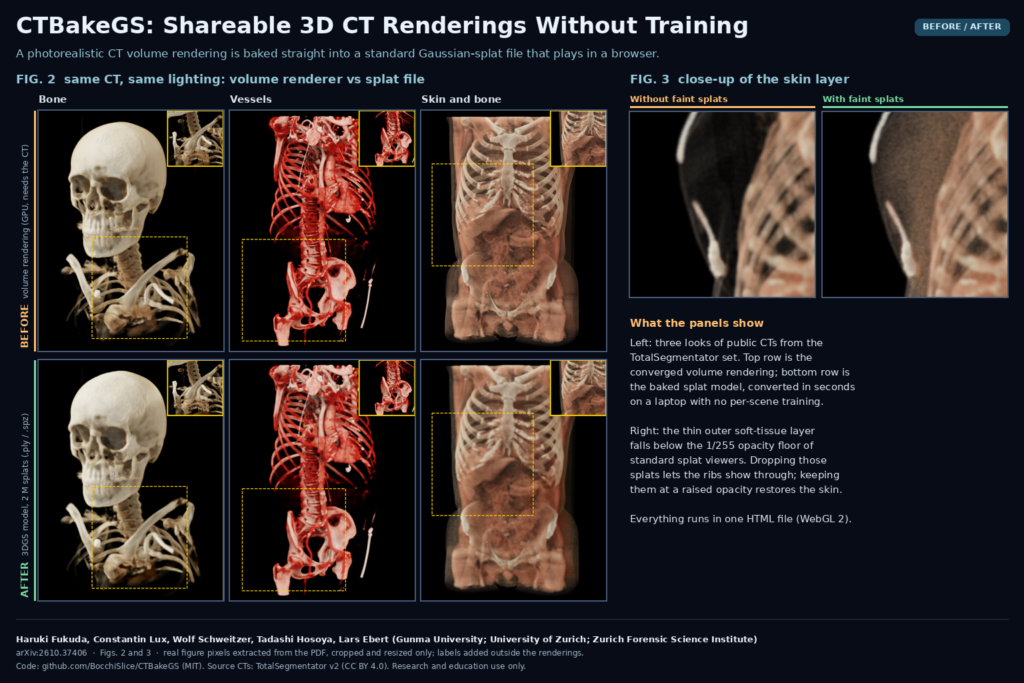
Cinematic or photorealistic volume rendering is one of the easiest ways to show a surgeon, a student or a patient what a CT contains. The problem is getting it to them. The rendering needs the CT data, a dedicated renderer and a decent GPU, so in practice it travels as a screenshot or an MP4. Haruki Fukuda (Gunma University), Constantin Lux and Wolf Schweitzer (Institute of Forensic Medicine, University of Zurich), Tadashi Hosoya (Gunma University) and Lars Ebert (Zurich Forensic Science Institute) take a different route in arXiv:2610.37406. Their tool, CTBakeGS, converts the lit volume rendering straight into a 3D Gaussian splatting (3DGS) model, with no training, in a single HTML file that runs in Chrome or Edge. The code is public under the MIT license.
What 3D Gaussian splatting brings to CT
A 3DGS model is a cloud of small, soft, semi-transparent blobs. Each splat has a position, a size, an opacity and a colour, and a graphics card can sort and blend millions of them per frame. Standard 3DGS viewers already exist for desktop, web and head-mounted displays, and the files (.ply, or the compressed .spz) open without any CT data or medical software behind them.
Most medical 3DGS work so far optimises the splats against tens to over a thousand rendered views per scene, which takes minutes to over an hour on a dedicated GPU, and the model has to be rebuilt when you change the transfer function. Feed-forward networks are faster but first need training on hundreds of volumes. The CTBakeGS authors point out that a CT volume already tells you where the material is, how opaque it is and, once lit, what colour it should be. So they compute the splats from the volume instead of learning them from images.
How the conversion works
- Bake the lighting first. Each splat gets one view-independent colour, so lighting and shadows have to be computed before conversion. CTBakeGS reuses its own renderer’s light volume: sky-dome visibility in 24 directions plus transmittance towards a key light for soft shadows.
- Place cells on an adaptive octree. The volume is split into cubic cells measured in millimetres, starting four voxels wide and subdividing only where the transfer-function opacity changes, down to sub-voxel size at boundaries. Homogeneous regions keep one large splat. The finest cell size is tuned so the model lands within 8% of a target splat count, usually after two or three passes.
- Sample colour and opacity per cell. The GPU samples each cell at 27 points with the renderer’s own shading, then averages them into one colour and one opacity.
- Map cell opacity to splat opacity. Each cell becomes an isotropic Gaussian wider than the cell (standard deviation 0.55 times the cell size) so neighbours overlap without gaps. Overlap would make the model too opaque, so the authors rescale each splat’s optical depth analytically so that the stack adds up to the volume’s opacity along a ray.
- Keep the faint splats. Standard rasterisers drop anything below an opacity of 1/255, and .spz stores opacity in 8 bits. A thin translucent layer such as the skin is made entirely of such cells. CTBakeGS keeps them at random, with a probability proportional to their optical depth, and raises the survivors to a fixed small opacity. The expected opacity stays the same, and a hash of the cell index keeps the result deterministic.
The output is a plain .ply or .spz file. The viewer page also applies a Mip-Splatting style anti-aliasing compensation when drawing.
What it looks like on real scans
The team tested six public CTs from the TotalSegmentator v2 dataset, from head CT angiography to a polytrauma scan and a neck-to-leg CTA, all at 1.5 mm isotropic voxels, with three preset looks: bone, contrast-enhanced vessels, and skin and bone. Each splat model was compared with a converged rendering of the same scene from the same renderer.
The featured image above uses Figure 2 and Figure 3 of the paper. In Figure 2 the reference rendering and the two-million-splat model look nearly identical at page size. For bone in wide views, the splat models reached a PSNR of 32.6 dB against the reference, which the authors translate into a root-mean-square error of about 6 grey levels out of 255. Figure 3 shows what step 5 fixes. Without the faint splats, the outer soft-tissue layer of a chest disappears and the ribs show through. With them, the skin is back, with a fine grain visible at close range.
A two-million-splat conversion pass took 14.3 s on average on a 2024 MacBook Pro and about 29 s on a 2018 Windows desktop with a 4 GB GTX 1050 Ti. The finished model rendered at 68 frames per second at 800 x 800 pixels on the laptop and 28 on the old desktop. A two-million-splat .ply weighs 128 to 146 MB.
Why a viewer or clinic team should care
The tool opens DICOM (including JPEG 2000 and JPEG-LS compressed series, via the Cornerstone WebAssembly codecs) or NIfTI directly in the browser. The README says everything runs locally, so a test on real patient data does not send the study anywhere. For a team that builds web viewers, it suggests a clean split of work. Keep the heavy volume renderer where the CT lives, then hand out a lightweight, lit 3D model for everything downstream:
- Patient communication. The authors suggest packaging the model with the viewer page and sending it to patients as their own CT in a form that runs on an ordinary device.
- Surgical planning and teaching. A pre-lit 3D model of a fracture or vascular anatomy can go into a case conference deck, a teaching portal or a VR headset without a workstation.
- Forensics and documentation. The group comes from forensic imaging, and because splats are a common format, a CT rendering could sit in the same scene as a splat reconstruction of a crime scene.
- Portal previews. Our own suggestion: a segmentation or 3D printing service could attach an interactive, photorealistic preview to a case without shipping the DICOM study.
Where it falls short
- It is a picture of a rendering. Lighting, transfer function and clipping are fixed at conversion time. To change the look you convert again, and the model has no Hounsfield values, so you cannot window, measure density or scroll slices.
- No specular highlights. Colours are view-independent, so shiny reflections are lost. The authors list spherical harmonics as a next step.
- Close-ups are softer. Close-up views scored about 3 dB lower than wide views, and thin vessels next to dense bone get smoothed. The largest volume in the test set needed more splats to hold detail.
- Small, coarse test set. Six scans at 1.5 mm voxels. Clinical thin-slice scans can have up to ten times more voxels and will convert more slowly. Whether hairline fractures survive has not been tested.
- Fidelity is measured against its own renderer. PSNR, SSIM and LPIPS say how close the splats are to the reference image, not whether the anatomy is correct. No reader study has been done, and the README states the tool is for research and education only, not diagnosis or treatment decisions.
Code, license and how to try it
Everything is in github.com/BocchiSlice/CTBakeGS under the MIT license: a single CTBakeGS.html (JavaScript and WebGL 2, about 3.3 MB with the embedded decoders), plus Python evaluation scripts. There are no network weights because there is no network. Open the HTML file in a recent desktop Chrome or Edge, load a CT, pick a look and press Convert to 3DGS, then export .ply or .spz. The README warns that the first start on Windows can take about a minute while the browser compiles its GPU programs. Opening CTBakeGS.html?study=1 starts the study mode used for the paper, which you run on the same six TotalSegmentator CTs. The paper itself is CC BY 4.0, and the authors disclose that the code was written with help from an AI coding model and then reviewed and tested by them.
Paper: Fukuda H., Lux C., Schweitzer W., Hosoya T., Ebert L. “CTBakeGS: training-free baking of photorealistic CT volume renderings into 3D Gaussian splats.” arXiv:2610.37406, 2026. Featured image: Figures 2 and 3 of the paper (CC BY 4.0), extracted from the PDF, cropped and resized only.