
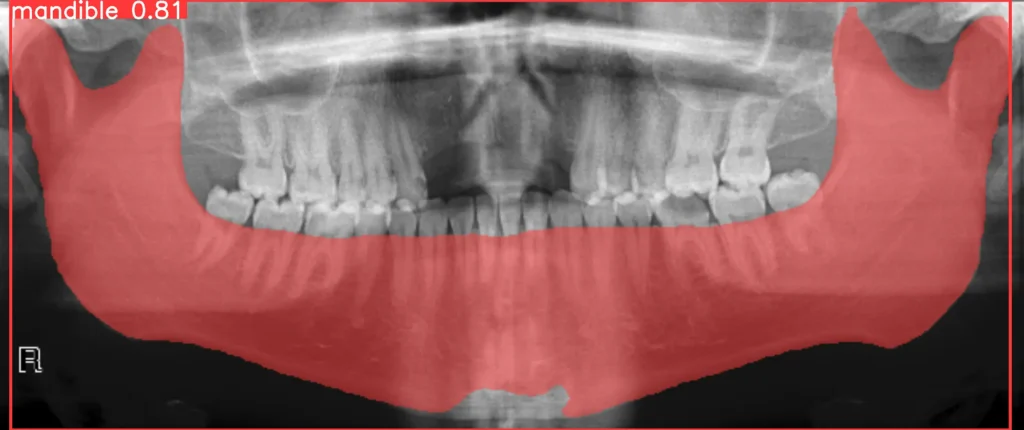
This is how I train YOLOv8-seg on panoramic mandible X-rays with the PYCAD dataset helpers: download PanMandible, convert masks to polygons, split, write dataset.yaml, train, infer. It is not a generic segmentation explainer — that is medical image segmentation. It is not heart-chamber work and it is not a lung-segment article.
Dental product work (CBCT, ortho reports) is a different job. If that is what you came for: orthodontic reporting + CBCT segmentation and the rest of the case studies.
Download the dataset
The images and masks started on Mendeley as hxt48yk462/2. They are packaged in PYCAD as PanMandibleDataset so you can pull the set onto a machine without hand-sorting folders.
from pycad.datasets.segmentation.diverse import PanMandibleDataset

dataset_downloader = PanMandibleDataset()
dataset_downloader.download('all')
Masks to polygons
The download is images plus binary masks. YOLO segmentation wants polygon text files, not PNGs. PngToTxtConverterMC traces each mask. The third argument is a simplification coefficient — 0.001 is 0.1%.
from pycad.datasets import PngToTxtConverterMC

input_folder = '/content/datasets/xray_panoramic_mandible/masks'
output_folder = '/content/datasets/xray_panoramic_mandible/txt'
converter = PngToTxtConverterMC(input_folder, output_folder, 0.001)  # 0.1%
converter.run()
Train / valid split
80 / 20. No test split in this run (0.0). delete_input=False keeps the source folders.
from pycad.datasets import DataSplitter

img = '/content/datasets/xray_panoramic_mandible/images'
msk = '/content/datasets/xray_panoramic_mandible/txt'
output = '/content/datasets/xray_panoramic_mandible/yolo'
splitter = DataSplitter(img, msk, output, 0.8, 0.2, 0.0, delete_input=False)
splitter.run()
dataset.yaml
Ultralytics wants a yaml that points at train and valid and names the class. One class: mandible.
from pycad.datasets import YOLODatasetYaml

path_train = '/content/datasets/xray_panoramic_mandible/yolo/train'
path_valid = '/content/datasets/xray_panoramic_mandible/yolo/valid'
config = YOLODatasetYaml(path_train, path_valid, 1, "mandible")
config.create_yaml("./datasets/xray_panoramic_mandible/yolo/dataset.yaml")
Train the model
Small segmenter: yolov8s-seg.yaml with the yolov8s.pt backbone. Mosaic is off. copy_paste=0.3 is on. The rest of the block is the run I used.
from ultralytics import YOLO

model = YOLO('yolov8s-seg.yaml').load('yolov8s.pt')

dataset_path = "/content/datasets/xray_panoramic_mandible/yolo/dataset.yaml"
results = model.train(data=dataset_path, epochs=100, imgsz=640, batch=8, patience=30,
                    lr0=.01, lrf=.002, momentum=.937, weight_decay=.0005, warmup_epochs=3.0,
                    warmup_momentum=0.8, warmup_bias_lr=.1, box=7.5, cls=.5, dfl=1.5, pose=12.0,
                    kobj=1.0, label_smoothing=0.0, nbs=64, hsv_h=.015, hsv_s=.7, hsv_v=.4, degrees=.0,
                    translate=.1, scale=.0, shear=.0, perspective=.0, flipud=.5, fliplr=.5, mosaic=.0,
                    mixup=.0, copy_paste=.3
                    )
Inference
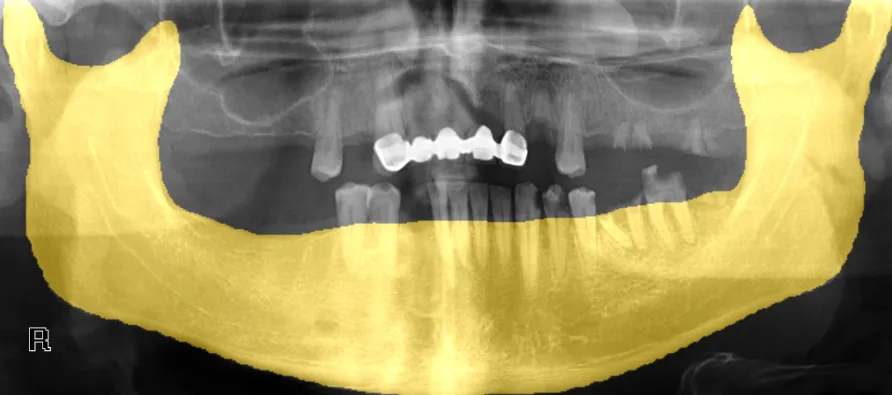
Use your weights, or run the notebook on GitHub: amine0110/pycad — tutorials/pycad_yolov8.ipynb. Overlay on a panoramic:
Courses and the service page stay where they are if you want the broader stack. This page stays the panoramic-mandible train loop.
PYCAD builds the imaging side of this when the mask has to live in a clinic app. Dental / ortho CBCT case · Case studies.