
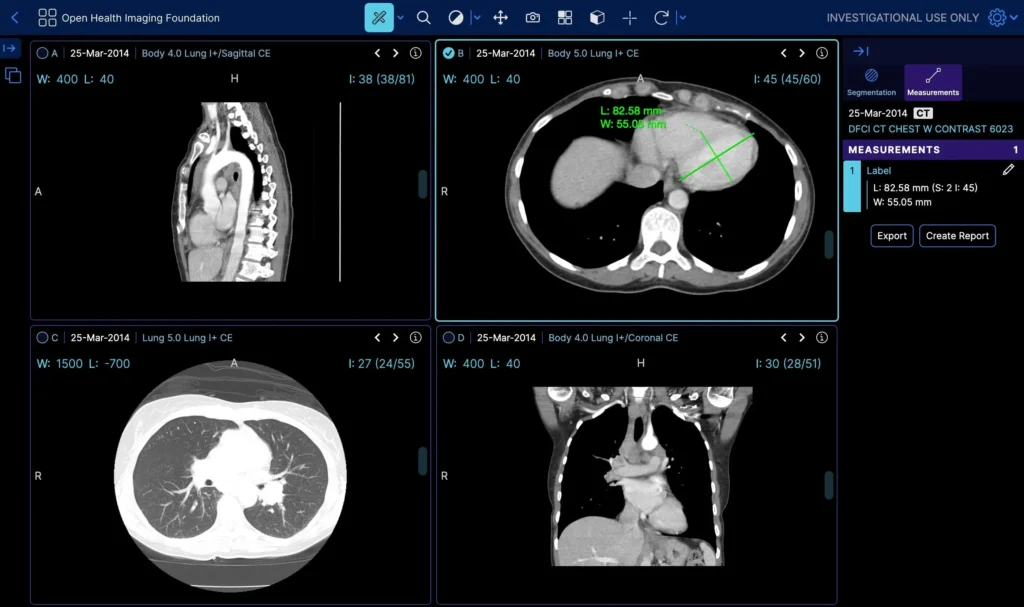
The OHIF viewer is the open-source web DICOM viewer from the Open Health Imaging Foundation. It is a React app that renders images with Cornerstone3D, pulls studies over DICOMweb from a server you already run, and grows through modes and extensions. Users open it in a browser, so there is no desktop client to install.
Extending OHIF is usually enough when your studies already sit in a DICOMweb archive (Orthanc, dcm4chee, a cloud imaging API), your readers expect standard radiology hanging and tools, and what is missing fits in a few custom panels or one extension, such as a model score shown next to the series.
A custom viewer pays off when the workflow is specialty-shaped, like a dental arch and panoramic curve on CBCT or surgical planning views. It also pays off when the viewer has to live inside your own product, when branding and login run deep into the host app, when users open local files or work offline with no archive behind them, or when your fork has drifted so far from upstream that every OHIF release turns into a round of merge work.
We at PYCAD wrote the longer comparison in OHIF vs a specialty custom DICOM viewer. If you already know you need the custom route, our custom DICOM viewers page describes how we build them. The rest of this post covers what OHIF is made of, how a first instance comes up, and where it fits.
What you are installing
OHIF is the front end. The pixels go through Cornerstone (Cornerstone3D in the current Viewer v3). The study list and image retrieval talk DICOMweb to a server you provide. The default repo has no OHIF cloud behind it.
| Piece | Job | What it is not |
|---|---|---|
| OHIF Viewer | Study list, hanging, window/level, MPR, measurements, extensions | A PACS, a VNA, or a diagnostic workstation cleared out of the box |
| Cornerstone3D | Decodes and renders the image; tools such as window/level, length, probe, stack scroll | The hospital archive |
| DICOMweb | QIDO-RS (find), WADO-RS (get), STOW-RS (store) | A USB stick of .dcm files. C-STORE is the DIMSE equivalent; browsers speak HTTP |
| A server | Orthanc, dcm4chee, a cloud medical imaging API, anything that speaks DICOMweb | Bundled with OHIF. You point the viewer config at one |
Useful links: the code at github.com/OHIF/Viewers, the docs at docs.ohif.org, the public demo at viewer.ohif.org, and the project site at ohif.org.
How a first instance comes up
The docs path looks like this:
- Install Node LTS and Yarn.
- Clone the Viewers repo and install dependencies.
- Start the dev server.
- Edit the app config so its data source points at a DICOMweb root.
Orthanc with the DICOMweb plugin is the usual store on a laptop. Load a few anonymized studies into it, point OHIF at it, and compare what you see with the public demo so you know what a working setup looks like. Without a store you get an empty study list.
What you configure
Most of the early work is configuration:
- wadoRoot and qidoRoot tell OHIF where studies live. A wrong path or a missing slash means no studies. If the store runs on a different origin, CORS headers on the server will cost you time until they are right.
- Modes combine a hanging with a set of panels: a basic viewer, a measurement mode, a segmentation mode if you added that extension.
- Extensions are how OHIF takes new features. A custom panel, a model score, or a hanging for one specialty belongs in an extension, so you avoid forking the whole repo.
- Auth is yours to add. The local demo has no hospital login. OIDC, or a gateway in front of the viewer and the archive, is the usual answer.
OHIF has a basic mode for dropping local files into the page, but its study list, configuration and day-to-day workflow assume a DICOMweb server. Teams with a folder of DICOM files often put a small Orthanc or a static WADO setup in front of it. A browser will not open a study from a local file URL.
What OHIF is good at
OHIF gives you a web viewer you can brand, hang, and extend without shipping a thick client. We see it fit well in:
- teaching and research viewers
- a viewer pane inside a portal
- vendor demos of an imaging product
- a specialty worklist in the browser, when the specialty still reads like standard radiology
Where it stops
A default OHIF build is not automatically cleared for primary diagnosis because it is OHIF. If your product is heading toward clinical use, our notes on FDA medical device approval cover the process.
OHIF is a browser viewer for DICOM studies. 3D Slicer is a research desktop for segmentation, registration and Python scripting. If you want to open a file and paint a mask, our Slicer and ITK-SNAP guide covers that path.
OHIF also does not store anything. The archive side is covered in PACS and DICOM, and a broader list of desktop and web tools is in DICOM viewer software.
Extend OHIF or build a custom viewer
| Your situation | Extend OHIF | Build custom |
|---|---|---|
| Studies already in a DICOMweb archive | Good fit | Possible, rarely needed for this alone |
| Standard radiology hanging and tools | Good fit | Overkill |
| A few extra panels or one model overlay | Good fit, as extensions | Overkill |
| Dental arch, panoramic curve, surgical planning views | Heavy extension work | Usually the better path |
| Viewer embedded in your own product, your login and branding throughout | Possible, with ongoing upkeep | Usually the better path |
| Local files or offline use as the main workflow | Works against the grain of the design | Usually the better path |
| A fork that is hard to merge with each release | Cost keeps growing | Worth pricing out |
Start with the docs, a local Orthanc, and the public demo. Change the viewer config before you change the code, and keep custom work in extensions as long as you can. When the extension list keeps growing and the merges keep hurting, price out a custom viewer.
Send us your OHIF backlog
If you are weighing an OHIF fork against a custom build, send us your OHIF backlog: the panels, tools, branding and workflow changes you have queued up. We at PYCAD will tell you which items fit as OHIF extensions and which point toward a custom viewer. Contact us here.